
Receipt and bill capture for practices on FreeAgent
You check each document, then publish it to the client's FreeAgent company. Nothing reaches FreeAgent until someone in your practice has reviewed it and clicked Publish.
Otto learns one client at a time. His suggestions draw on the bills you've published through Capture for that client, including any changes you made in review. Bills already in FreeAgent from before you connected the client aren't part of that history, so it builds up as you publish. He draws on that history only when he's confident the supplier on the document is the contact it belongs to. Otherwise, and for a supplier the client hasn't used before, he suggests a category from the document alone.
Built by a practice, for practices
We run an accounting practice. We tried a lot of receipt capture tools, and none had the mix of features and pricing that worked for our clients. The small rough edges added up too, using them day in, day out.
So we built Otto Capture around the jobs that took our time, and those jobs are the same whichever accounting platform a client is on. Clients send documents without creating an account. They answer their missing receipts from one list, not a spreadsheet. And Otto reads every line and suggests a category from that client's own history.
Connecting your FreeAgent practice
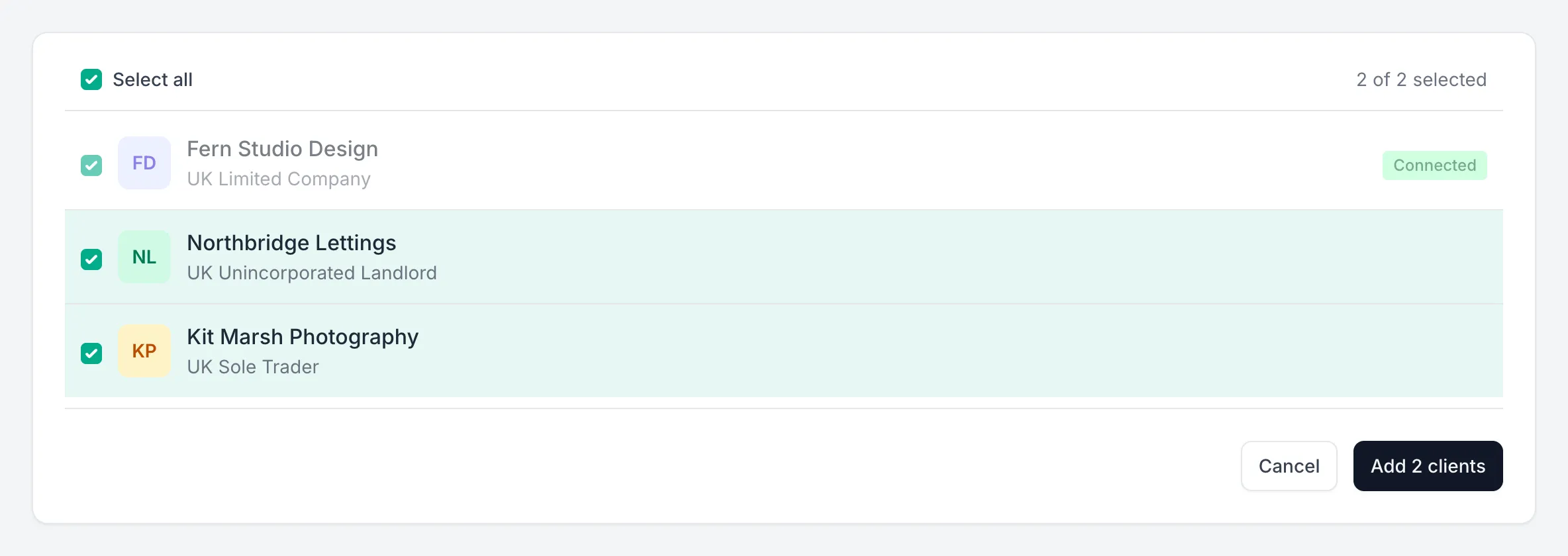
Connect Capture to your Practice Dashboard once, then add clients from it. Capture lists the clients your practice manages, each with its entity type, and you tick the ones to add. Each becomes a client in Capture with its own inbox and settings, and every one shares the practice connection.
To add more later, go back to the same list. Clients you've already added show as Connected.
You can also connect a single FreeAgent company on its own, signed in as a user who can manage bills in it.
Capture then brings across what Otto needs to code and publish: contacts, categories, tax rates, currencies, and the company's details. If you add a category in FreeAgent later, refresh the client's data in Capture to bring it across.
Permissions, and everything Capture brings across, are covered in Otto Capture's FreeAgent guide.
From a client's document to FreeAgent
- Your client sends a receipt or bill by email, through their submission page, or on WhatsApp.
- Otto reads it, line by line, matches the supplier to one of the client's FreeAgent contacts, and suggests a category and tax rate for each line.
- Someone in your practice checks it and changes anything that needs it.
- You click Publish, and Otto publishes it to the client's FreeAgent company.
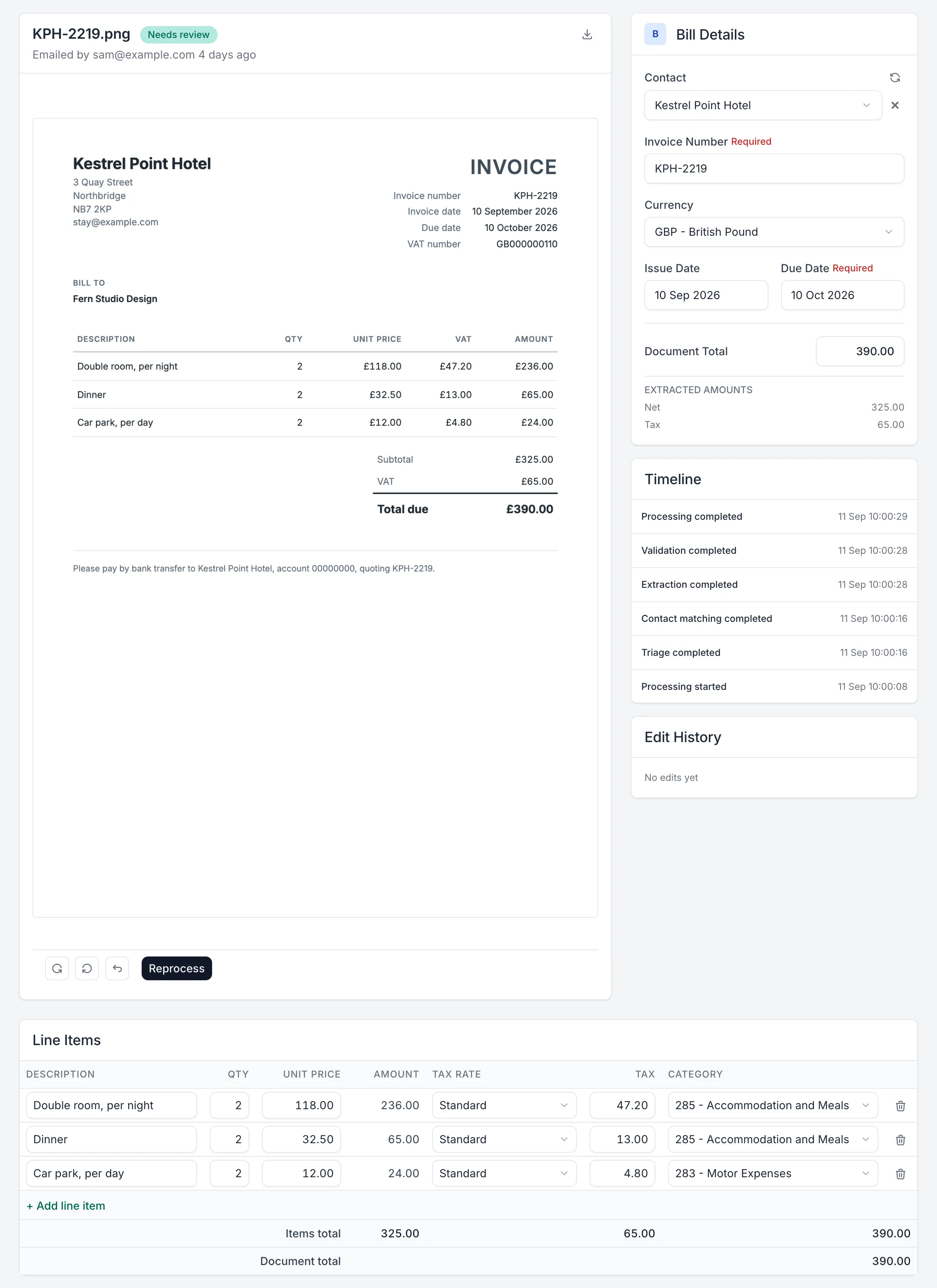
Otto publishes bills, bill credit notes, sales invoices, and credit notes to FreeAgent.
Line items and categories
Each line item you've reviewed becomes a line on the bill or invoice in FreeAgent, with its category and tax rate.
How each document arrives
Bills and bill credit notes go straight into the client's FreeAgent company, with the original document attached. Sales invoices and credit notes arrive as drafts.
Otto attaches the original document up to 5 MB. Where FreeAgent doesn't accept the file type, such as an iPhone photo saved as HEIC or a Word file, Capture attaches a PDF or image version of it. FreeAgent doesn't let Capture attach files to sales invoices or credit notes, so they publish without one, and the original stays in Capture.
Contacts
Otto matches the supplier or customer on each document to the client's FreeAgent contacts. He remembers which contact you published each supplier name against, for that client. Where a name doesn't match a FreeAgent contact exactly, he uses that to match the next document. If the contact isn't in FreeAgent yet, you can create it during review, and Capture adds it to FreeAgent when you publish.
Foreign currency
A document in any currency FreeAgent supports publishes in that currency, and FreeAgent applies its own exchange rate.
For a currency FreeAgent doesn't support, convert the document during review. You can also convert a document FreeAgent would accept, for example so the bill matches the amount that cleared the bank. Enter the total the client was actually charged, and Otto restates every line at that rate. He puts anything left over from rounding on the most suitable line, so the lines add up to your total exactly. He also compares your total with the market rate on the document's date. Where the two differ by more than he'd expect, he asks you to check the total before applying it, which catches a mistyped figure.
Chasing missing receipts
Capture turns the payments you have no paperwork for into a list the client answers.
- On the client's Missing receipts tab, choose the dates and click Fetch transactions. Capture reads the unexplained bank transactions from every bank account in the client's FreeAgent company that isn't hidden, credit cards included. The dates start at the last six months, and you can change either one.
- Exclude the payments the client doesn't need to explain, such as transfers between their own accounts, and any that shouldn't be seen by everyone with the link, such as salaries. Every other payment goes on the list.
- Share the client's link, when and how it suits your practice and the client. Capture doesn't contact the client, so it fits the way you already work with them.
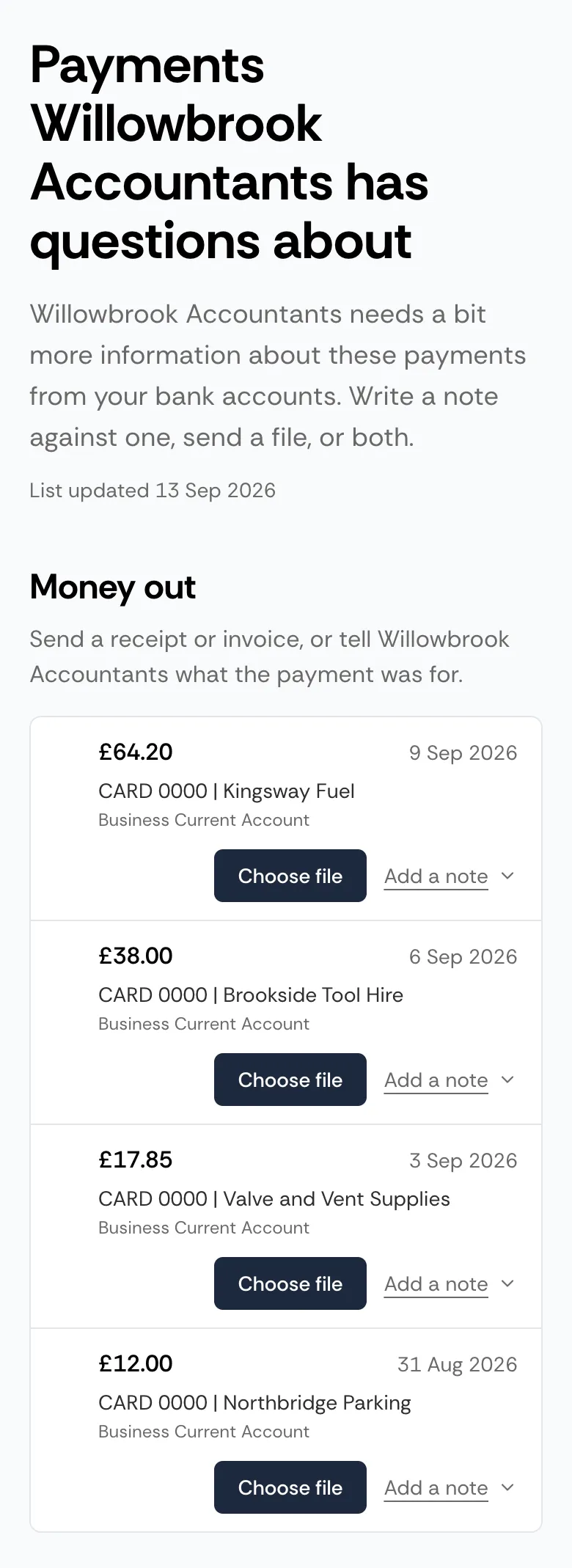
- Your client opens the link on any device, with no login, and answers each payment with a receipt, a short note, or both.
- Receipts go into that client's review queue like any other document, with the note alongside when you review it. You can see which payments are still waiting for an answer.
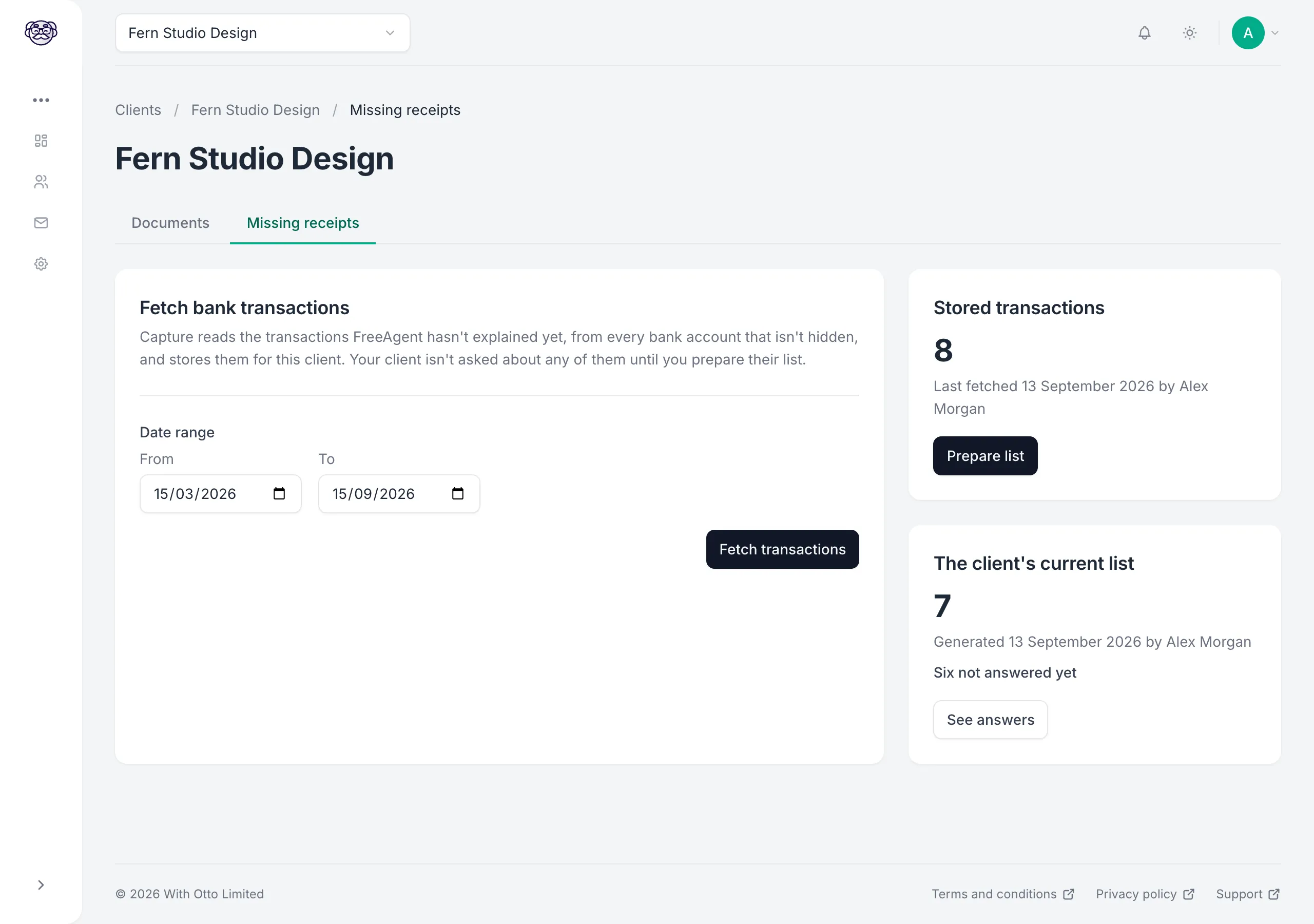
Fetch again whenever you want the list up to date. A payment explained in FreeAgent since the last fetch comes off the client's list when you next update it. Anything you've excluded stays excluded, and anything the client has answered keeps its answer.
The link can go to whoever can find the receipts, such as the people at the client who hold the company cards. Your contact at the client can pass it on, or you can send it to each person yourself. Anyone with the link can see the date, description, amount, and bank account of each payment on the list, and your admins can replace the link or switch the page off at any time.
Capture reads the transactions only when you click Fetch transactions, and changes nothing in FreeAgent. Fetching transactions and preparing lists cost nothing extra. The full steps are in the guide to missing receipts for FreeAgent clients.
How clients send documents
Each client has its own email address, submission page, and WhatsApp invite link. You choose which of them to give the client, so they use the routes that suit them and your practice.
- Email: the client forwards or sends documents to their own address.
- Submission page: they upload files from any device.
- WhatsApp: they send a photo or file after joining through the invite link.
Whoever holds the receipts uses the route that suits them. They don't create an account or install anything, and you don't register them in advance. You can also upload files yourself. Everything arrives in the same review queue, whichever way it's sent. There's more on each route on the Otto Capture page.
What it costs
Otto Capture is priced per client, per month, on three tiers, and each client sits on whichever tier costs least for what it published that month.
Small
£9per client, per month, excl. VAT
- Included published documents
- Up to 50
- Each extra document
- 18p
Medium
£15per client, per month, excl. VAT
- Included published documents
- Up to 125
- Each extra document
- 12p
Large
£29per client, per month, excl. VAT
- Included published documents
- Up to 350
- Each extra document
- 8p
- No documents, no charge.
- Always the cheapest tier.
Estimate your monthly cost
Tell us how your clients split across the tiers. A best guess is enough, because most clients cost exactly their tier’s price.
About £156
per month, excluding VAT
£36 saved4 clients with nothing published cost £04 clients at £0
Some clients busier than their range? There’s no jump to a bigger bill. Extra documents are charged at the tier’s per-document rate until the next tier works out cheaper, and the client then moves up automatically.
Full pricing is on the Otto Capture page.
Try it on as many FreeAgent clients as you like
The free 30-day trial has no limit on clients or documents, so connect your Practice Dashboard and add as many clients as you like. We'd suggest putting Otto through his paces: include the clients whose paperwork takes longest each month, and send in a few weeks of their receipts and bills. Review them with every line already read and a category suggested, then fetch their unexplained transactions and send them their missing receipts link.
Otto Capture is available to UK accounting and bookkeeping practices.
Your clients can be on any mix of Xero, FreeAgent, and QuickBooks Online. On QuickBooks Online, Otto publishes purchases.